728x90
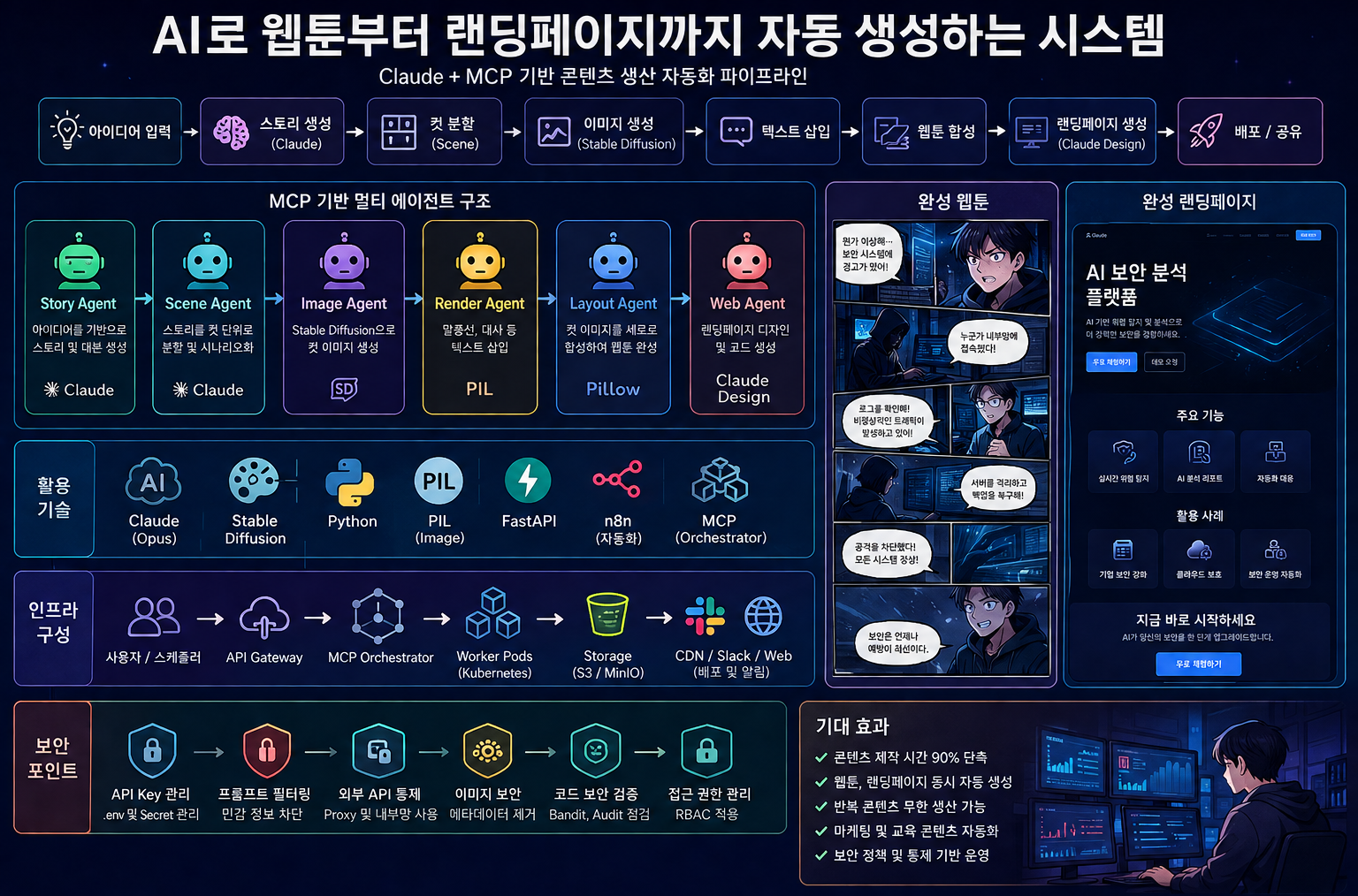
왜 지금 ‘콘텐츠 자동화’가 중요한가
✔ 기존 방식의 한계
- 디자이너 → 개발자 → 배포 (시간 오래 소요)
- 콘텐츠 제작 비용 높음
- 반복 작업 많음
✔ AI 기반 방식
👉 “프롬프트 기반 생산 시스템”
아이디어 → 자동 생성 → 수정 → 배포👉 결과
- 제작 시간 90% 감소
- 반복 콘텐츠 무제한 생성
- 마케팅 자동화 가능
스토리 생성 (LLM)
✔ 프롬프트
Create a webtoon story:

Genre: cybersecurity
Panels: 6

Include:
- scene
- emotion
- dialogue
- camera angle
✔ 결과 구조
[
  {
    "scene": "dark server room",
    "emotion": "tense",
    "dialogue": "We’ve been breached...",
    "camera": "wide shot"
  }
]
💡 실무 포인트
- 반드시 “패널 단위”로 생성
- 감정 + 카메라 포함 → 이미지 품질 상승
이미지 자동 생성
✔ Python 예제
import requests

def generate_image(prompt):
    return requests.post(
        "http://localhost:7860/sdapi/v1/txt2img",
        json={
            "prompt": prompt,
            "steps": 20
        }
    ).json()
✔ 프롬프트 생성 함수
def build_prompt(panel):
    return f"""
    webtoon style,
    {panel['scene']},
    emotion: {panel['emotion']},
    {panel['camera']}
    """
💡 품질 향상 전략
- LoRA → 캐릭터 고정
- ControlNet → 포즈 유지
- 스타일 고정 문구 사용
대사 삽입
from PIL import Image, ImageDraw

def add_text(img_path, text):
    img = Image.open(img_path)
    draw = ImageDraw.Draw(img)
    draw.text((50, 600), text, fill="white")
    img.save("out.png")
웹툰 병합
def merge_vertical(images):
    total_height = sum(i.height for i in images)
    max_width = max(i.width for i in images)

    result = Image.new("RGB", (max_width, total_height))

    y = 0
    for img in images:
        result.paste(img, (0, y))
        y += img.height

    result.save("webtoon.png")
랜딩페이지 자동 생성 (Claude Design)
PRD 작성 (핵심)
서비스: AI 보안 플랫폼

구성:
- Hero
- Features
- CTA

스타일:
- Dark
- Glass UI
- Neon
프롬프트
Create a modern landing page:

- dark theme
- glassmorphism
- smooth scroll animations
- hero + features + CTA
개선 반복
Add:
- parallax
- fade-in animation
- hover effect
자동화 (n8n / Python)
✔ n8n 워크플로우
Webhook
 ↓
스토리 생성
 ↓
패널 분리
 ↓
이미지 생성
 ↓
텍스트 삽입
 ↓
웹툰 생성
 ↓
Slack 업로드
✔ CLI 자동화
python generate.py --topic "security breach"데이터 유출 위험
위험
- 프롬프트에 내부 정보 포함
- SaaS AI에 데이터 저장
대응
- 더미 데이터 사용
- 내부 서비스명 제거
- AI 사용 정책 수립
코드 보안
grep "http" index.html
npm audit
공급망 공격
체크
- CDN 사용 여부
- 라이브러리 출처
XSS / 콘텐츠 보안
grep "innerHTML" index.html이미지 보안
exiftool -all= *.png👉 메타데이터 제거 필수
조직 적용 전략
✔ AI 사용 정책
- 민감정보 입력 금지
- 승인된 AI만 사용
- 로그 관리 필수
✔ 개발 프로세스
AI 생성 → 검증 → 승인 → 배포✔ 운영 자동화
- CI/CD 연동
- Slack 알림
- 결과 자동 저장
실제 활용 사례
✔ 마케팅
- 제품 소개 웹툰
- 랜딩페이지 자동 생성
✔ 보안 교육
- 피싱 시나리오 웹툰
- 사고 대응 교육
✔ SaaS 서비스
- 고객용 콘텐츠 자동 생성
- 이벤트 페이지 자동화
“콘텐츠 생산 시스템 자동화”
✔ 가능해지는 것
- 웹툰 자동 생성
- 랜딩페이지 자동 생성
- 마케팅 자동화
✔ 반드시 기억할 것
- 프롬프트가 품질을 결정
- 반복 개선이 핵심
- 보안 통제 없으면 위험
Python 기반 웹툰 자동 생성
📁 프로젝트 구조
webtoon-gen/
 ├── main.py
 ├── agents/
 │   ├── story.py
 │   ├── image.py
 │   ├── render.py
 │   ├── merge.py
 ├── output/
Story Agent (Claude 연동)
# agents/story.py
import requests

def generate_story(topic):
    prompt = f"""
    Create a webtoon story (6 panels)
    Topic: {topic}

    For each panel include:
    - scene
    - emotion
    - dialogue
    - camera
    """

    response = requests.post(
        "https://api.anthropic.com/v1/messages",
        headers={"Authorization": "Bearer YOUR_API_KEY"},
        json={
            "model": "claude-opus-4",
            "messages": [{"role": "user", "content": prompt}]
        }
    )

    return response.json()
Image Agent (Stable Diffusion)
# agents/image.py
import requests

def generate_image(prompt, filename):
    res = requests.post(
        "http://localhost:7860/sdapi/v1/txt2img",
        json={
            "prompt": prompt,
            "steps": 20,
            "width": 512,
            "height": 768
        }
    ).json()

    image_data = res["images"][0]

    with open(filename, "wb") as f:
        import base64
        f.write(base64.b64decode(image_data))
Render Agent (텍스트 삽입)
# agents/render.py
from PIL import Image, ImageDraw, ImageFont

def add_text(image_path, text, out_path):
    img = Image.open(image_path)
    draw = ImageDraw.Draw(img)

    font = ImageFont.truetype("arial.ttf", 28)

    draw.text((50, 650), text, fill="white", font=font)

    img.save(out_path)
Merge Agent (웹툰 생성)
# agents/merge.py
from PIL import Image

def merge(images, output):
    imgs = [Image.open(i) for i in images]

    total_height = sum(i.height for i in imgs)
    max_width = max(i.width for i in imgs)

    result = Image.new("RGB", (max_width, total_height))

    y = 0
    for img in imgs:
        result.paste(img, (0, y))
        y += img.height

    result.save(output)
Main 실행
# main.py
from agents.story import generate_story
from agents.image import generate_image
from agents.render import add_text
from agents.merge import merge

import os

topic = "AI security breach"

story = generate_story(topic)

images = []

for i, panel in enumerate(story):
    prompt = f"{panel['scene']}, {panel['emotion']}, {panel['camera']}"

    img_file = f"output/{i}.png"
    txt_file = f"output/{i}_text.png"

    generate_image(prompt, img_file)
    add_text(img_file, panel['dialogue'], txt_file)

    images.append(txt_file)

merge(images, "output/webtoon.png")
MCP 기반 자동화 구조
✔ Agent 정의
class Agent:
    def run(self, input):
        raise NotImplementedError
✔ Orchestrator
class WebtoonPipeline:
    def __init__(self, story, image, render, merge):
        self.story = story
        self.image = image
        self.render = render
        self.merge = merge

    def run(self, topic):
        panels = self.story.run(topic)

        images = []

        for p in panels:
            img = self.image.run(p)
            img2 = self.render.run(img, p["dialogue"])
            images.append(img2)

        return self.merge.run(images)
Claude + MCP → 랜딩페이지 자동 생성
✔ Web Agent
def generate_landing(summary):
    prompt = f"""
    Create a landing page based on this story:
    {summary}

    Include animations and CTA
    """

    # Claude 호출
완전 자동 실행 (FastAPI)
from fastapi import FastAPI

app = FastAPI()

@app.post("/generate")
def generate(topic: str):
    pipeline = WebtoonPipeline(...)
    result = pipeline.run(topic)

    return {"status": "done", "file": result}
API Key 보호
.envimport os
API_KEY = os.getenv("CLAUDE_API_KEY")프롬프트 필터링
def sanitize_input(text):
    banned = ["internal", "password", "token"]
    for b in banned:
        if b in text:
            raise Exception("blocked")
    return text
외부 API 통제
- Stable Diffusion → 내부망 운영
- Claude → Proxy 경유
이미지 보안
exiftool -all= *.png코드 검증
pip install bandit
bandit -r .
728x90


댓글